
Mobile Proxy Explained: What It Is and How It Works
Table of Contents
Key takeaways
Mobile proxies use devices with mobile data, such as smartphones, to route your traffic through them to change your IP address, allowing you to bypass geo-restrictions and blocks.
Mobile proxies are difficult for websites to detect because of the shared dynamic IPs in mobile networks.
anyIP offers some of the best mobile proxies for an affordable price of $2/GB with over 100 million IP pool.
DIY proxies require a complicated setup involving SIM cards and smart devices across various geographic locations.
Imagine you’re a developer trying to test your app’s location-specific features. Or a business trying to scrape data from mobile websites without getting blocked or flagged. Or a marketer trying to check mobile ad targeting or geolocation.
All these scenarios have one thing in common - they’re all much easier with a quality mobile proxy.
Mobile proxies let you browse the web with a mobile IP address, making it seem like you’re accessing websites from a smartphone or tablet. We’ll explore everything you need to know about mobile proxies: what they are, how they work, and why you might want to use them.
What Is a Mobile Proxy?
A mobile proxy is a middleman that routes your requests, allowing access to the internet through a device connected to a cellular network. As such, your IP address is hidden, and only the one from a mobile proxy server is visible.
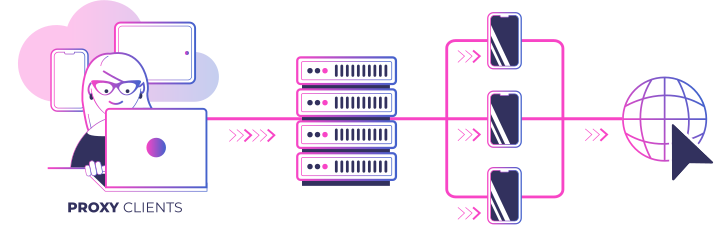
We will get into technical details, but for now, we can define what is a mobile proxy by examining what it does:
Hide your true IP address
Spoof your location
Bypass restrictions or blocks from certain websites or services
Pose as genuine mobile traffic
The last point is important when comparing mobile proxy servers with other types, such as mobile vs residential proxies. Since the IP originates from real mobile carriers, your connection appears as that of a mobile visitor.
It's crucial for online activities that require mobile traffic, such as social media management, ad verification, data collection, and other use cases. Proxy providers offer different mobile proxy types and configurations, but the main types are generally as follows.
Mobile proxy types and features
IP rotation. Rotating proxies change the IP address at set intervals, helping to remain undetected when scraping or automating tasks. Static or sticky session proxies retain the same IP address for a few minutes up to a few days for tasks like logging in to accounts or making payments.
Access type. Private mobile proxies, also called dedicated proxies, provide exclusive access to a single user, while shared proxies are available to multiple users simultaneously. Most mobile IPs are inherently shared due to the mobile carrier infrastructure.
Mobile data network generation. Unlike other proxy types, mobile proxies may differ in the internet generation they use. 5G pools are the newest and fastest, but the least common, while 4G mobile proxies are a close second in speed.
Protocol support. As with all proxies, mobile proxies can use different protocols; SOCKS5 is the most versatile, and HTTPS is also popular.
Mobile Proxy IPs vs Other Proxy IPs
Using mobile IPs is one of the most reliable methods for routing your traffic if your goal is to prevent bans. Compared to how residential proxies work, for example, mobile proxy networks are even harder for websites to detect and block since proxy IPs are rotated with other mobile users.
VPN and proxy comparisons are also relevant since many of the same tasks can be accomplished with both. Yet there are important differences to consider before choosing among VPNs, datacenter, mobile, and residential proxies.
| Mobile Proxies | Residential Proxies | Datacenter Proxies | VPN | |
| Source | Mobile Networks | Home networks | Data centers | Data centers |
| Anonymity Level | Very High | High | Low | Very Low |
| Footprint | Low (hard to detect) | Low (hard to detect) | High (easier to detect) | High (easier to detect) |
| Blocking Risk | Low | Low to Moderate | High (often blacklisted) | High (often blacklisted) |
| User Identification | Hard (dynamic and diverse IPs) | Moderate (can be traced to individual households) | Easy (often static and tied to specific organizations) | Easy (often static and tied to specific organizations) |
| Speed | Slow to Fast (depending on the mobile network used) | Fast and Stable | Very Fast and Very Stable | Depends |
How Do Mobile Proxies Work?
Mobile proxies work similarly to other types, such as residential proxies, with one important difference. Your traffic is routed through a device, usually a smartphone or tablet, connected to a cellular network.
Request. You make a request for the target website, for example, by clicking a link or typing a URL. This generates an HTTP request that would normally be sent to the website’s server, packaged with your IP address.
Routing. The mobile proxy service routes the request through a mobile device that has its own IP address assigned by the carrier. The request appears to be coming from a different IP address, location, and device type than your original, i.e., directly from the proxy.
Response: The target website receives your request with the spoofed IP address and sends back a response to the mobile device. It is then routed back to you without your IP address ever being passed on to the target website.
Using mobile instead of residential IPs or other types creates a few important features that make these proxies stand out.
Mobile Network Gateway
Regular proxies route requests through a datacenter or a home network, whereas mobile proxies use mobile devices with IP addresses assigned by the carrier. So, when connecting to a mobile proxy, you're using a mobile network gateway that routes your request.
A mobile network gateway is the component that handles the handoff between your request and the carrier's mobile IP endpoint. As such, your requests appear as if from a genuine mobile device. There are two main ways to obtain IP pools and create gateways.
Consent-based SDK apps involve proxy providers partnering with app developers, embedding software in various apps, and asking users to share their mobile IPs.
SIM-farms require providers to purchase large numbers of mobile SIM cards and devices, connecting them in one network to sell their IPs.
Unreliable or free mobile proxies often use malicious SDKs in apps that don't require consent, or rely on low-quality SIM farms that also spread malware. Quality providers, such as anyIP, source only high-quality 5G/4 G mobile proxies from trusted, consent-based partnerships.
Benefits of Using Mobile Proxies
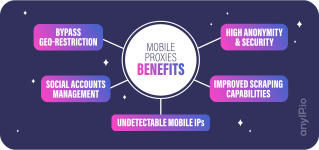
Access to geo-restricted content. Best mobile proxy networks, such as anyIPs, cover locations worldwide, allowing you to choose from a variety of IPs. It takes a couple of clicks to access localized data for tasks like market research, data collection, or simple browsing.
Mobile-only access. Various sites and services, such as social media platforms, require mobile IPs and block suspicious activity, including attempts to access multiple accounts from the same IP. Rotate multiple mobile IPs or use sticky sessions to significantly reduce the risk of account bans.
Improved web scraping. Collecting data from websites without being detected or blocked is a common challenge. Mobile proxies offer a solution by providing a pool of IPs that mimic real-user behavior, reducing the likelihood of being flagged by anti-scraping systems.
Enhanced online anonymity and security. Mobile proxies offer an additional layer of protection while browsing. By masking your real IP address, they safeguard against tracking and maintain privacy for tasks from simple browsing to complex automation.
High trust level. Because of the nature of mobile data network architecture, they do not assign a single IP address to each device. Hundreds of devices connected to the same antenna share one mobile IP. It makes mobile IPs the least likely to be banned by websites, as websites risk banning 100s of other users.
Dynamic IP Assignment
Due to the nature of cellular architecture, mobile IP assignments are dynamic. An IP is assigned when a device connects to a cell tower, and then changes as the device moves to different towers.
It creates a constantly changing IP address for the user, making it difficult for websites or services to accurately track their online activity. Additionally, carriers use a technology known as carrier-grade NAT to allow multiple users to share an IP address.
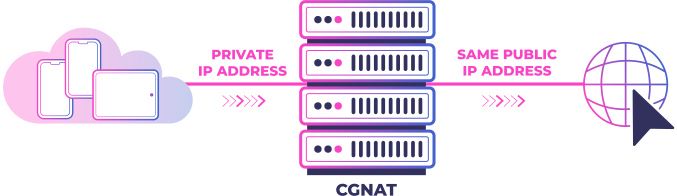
This is designed to allow individual towers to handle more devices without exhausting available IP addresses. An unintended effect is that it makes mobile proxies almost undetectable, since you’re often sharing an IP address with multiple genuine users.
For example, the UK mobile carrier O2 has 216,510 IP addresses distributed among 23.8 million users. That means at any given moment, up to 100 users are sharing a single IP address.
Real Devices
Best mobile proxy services use real smartphones to reroute your requests. They carry genuine fingerprints, with carrier-assigned IPs that mask your digital footprint even better than some residential proxies.
Using genuine devices for such networks brings higher IP trust scores, bringing additional protection against blocks. Websites also can't tell the difference between a proxy user and an ordinary mobile user, which enables access to mobile-only apps and services.
How to Set Up a Mobile Proxy
Choose a Mobile Proxy Service
The first step is to choose a quality mobile proxy provider. anyIP offers a convenient way to access mobile IPs without the hassle of managing SIM cards and devices yourself. Just choose a plan and connect instantly.
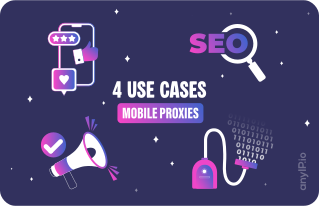
We’ve done the hard work of sourcing high-quality mobile IPs from all over the world and managing them, so you don’t have to. Our mobile proxies are perfect for businesses that need secure and reliable connections for various use cases:
Social media managers
Web scrapers and crawlers
SEO specialists
Market researchers
Mobile proxies tend to cost more than other proxy types. The reason is that mobile proxy connections also require sourcing physical SIM cards, devices, and data carrier plans. These expenses must be accounted for when compensating partners who provide the IP addresses.
Unlike some providers, anyIP charges only per GB of bandwidth used, not per port or per concurrency (active threads). With plans starting at $2 per GB, anyIP is an affordable option that also offers premium features. You'll also get world-class support, over 100 million mobile and residential IPs, and an impressive 99.3% success rate across all connections.
Integrate Proxies
You'll find your proxy credentials in the dashboard, where you can configure your proxy and adjust various settings. Authentication method (username/password or IP whitelisting), proxy protocol (HTTP, HTTPS, and SOCKS5), target country, and various other options are available.
Depending on your use case, you'll also need to choose a sticky session or set rotation options. Your IP can rotate with every request or at custom intervals of 1, 5, or 60 minutes. For guidance on whether sticky sessions or custom rotation is best, check out the latest guides on our blog.
DIY Mobile Proxies
For those with advanced knowledge in networking, setting up your own mobile proxies is also an option. Generally, the process involves at least three steps.
1. SIM Cards and Devices
SIM Cards. Acquire multiple SIM cards from different mobile carriers. These SIM cards will serve as the source of your mobile IPs.
Mobile devices or dongles. You’ll need mobile devices (like smartphones or tablets) or so-called mobile data dongles (USB devices that connect to the internet via SIM cards). These devices will host your proxies.
2. Software Infrastructure
Proxy server. Set up your proxy software, such as 3proxy or MicroSocks, on the SIM farm or a similar cloud-based service.
IP address rotation: Implement IP rotation to switch between different SIM cards. This ensures that your proxies stay fresh and avoid detection.
3. Configuration
Device Proxy Settings. Adjust the proxy settings on your mobile devices or dongles. Specify the IP address and port of your proxy server.
Authentication Details. Set up authentication for your proxies. Use a username and password or other authentication methods to secure access.
Are mobile proxies legal?
As with all proxies, mobile ones are legal in most countries when used for legitimate purposes. Legality for lawful-intent use cases, such as collecting public data, verifying ads, or conducting market research, is straightforward.
Accessing private data without authorization or violating a platform's terms of service can bring legal consequences. Proxies themselves are just networking tools. It's up to you how to use them. If in doubt, consider seeking legal counsel.
Conclusion
Overcoming the hurdles of geo-restrictions, social media management limitations, and scraping challenges is important. Mobile proxies offer a compelling solution, providing the flexibility, anonymity, and efficiency needed to excel in these tasks.
At anyIP, we offer users a secure, seamless, and affordable way to access a pool of mobile and residential proxies. Our team ensures our proxies stay fresh and undetected, so you can focus on what you’re working on.
Article by
Khaled Bentoumi
Khaled is a software engineer. He's been involved in many startups of different sizes. Previously, he founded Data to Page, an AI Programmatic SEO startup. He now handles all the marketing at anyIP.


:format(webp))
:format(webp))
Read more
:format(webp))
Scamalytics Proxy Detection Explained
Learn how fraud scores work, what the proxy and residential labels mean, and how to read a Scamalytics result for your own IPs.
:format(webp))
:format(webp))
Proxy vs VPN vs Antidetect Browser: Which to Choose?
Compare proxy vs VPN vs antidetect browser by IP address control, encryption, browser fingerprints, scalability, and the best use case for each.
:format(webp))
What Is TCP/IP Fingerprinting and How Does It Work?
Learn what TCP/IP fingerprinting is, how it works, what it can reveal, and how proxies, VPNs, and network devices affect your fingerprint.