
Residential Proxy Explained: What It Is and How It Works
Table of Contents
Key takeaways
Residential proxies use real IP addresses to bypass restrictions and enhance anonymity.
Residential proxy servers from anyIP offer rotating or sticky types and support HTTP/HTTPS and SOCKS5 protocols.
Residential IPs are harder to detect due to their association with real ISPs.
Common uses include web scraping, bypassing geo-blocks, multi-accounting, SEO monitoring, and others.
Nobody likes running into IP restrictions. Whether you’re trying to manage multiple social media accounts and get flagged for suspicious activity or run into blocks while web scraping data, the result is wasted time and missed opportunities.
Residential proxies can be the perfect solution, but you must know a thing or two before leveraging them. Learn what a residential proxy is, how they work, and how to set it up for your workflow.
What Is a Residential Proxy?
A residential proxy uses real household (residential) devices, like PCs or laptops, with IP addresses assigned by residential Internet Service Providers (ISPs). Like all proxy servers, they act as a middleman between your device and the internet, masking your original connection and presenting the IP and location of a residential device.
Compared with datacenter proxies, residential IP addresses are more difficult to detect because they originate from households. As a result, you stay anonymous while still appearing as a “regular” to the website.
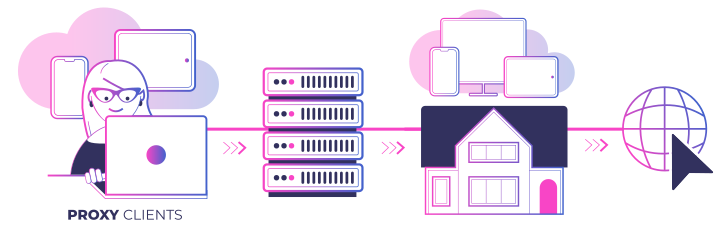
anyIP sources millions of high-quality residential and mobile IP addresses from all over the world. Changing your location to access geo-locked content, bypassing website restrictions, and staying undetected while web scraping is as simple as rotating your IP.
Types of Residential Proxies
Rotating proxies change your IP based on set custom periods for intervals of 1, 5, and 60 minutes. It's a great choice for even the most demanding tasks like large-scale web data collection.
Sticky (session-based) proxies retain the IP address for a session, offering greater control when managing logins and maintaining a consistent online presence.
Static residential proxies, also known as ISP proxies, combine the authenticity of residential ISPs with data center server performance. They compromise detection rates for speed increase.
The term “mobile residential proxy” is used by some providers to market residential proxy networks that include mobile IP addresses. It's largely a marketing term rather than a distinct type, so in most cases, mobile proxies and mobile residential proxies are the same.
Shared vs dedicated residential proxies
Shared residential proxies are proxy setups that allow multiple users to access the same IP address simultaneously. Dedicated residential proxies are assigned exclusively to a single user. Shared residential proxies are cheaper and, with the right settings, can perform similarly well.
anyIP proxy network is not dedicated to a single user. However, you get unlimited rotating residential proxies and access to the whole proxy pool. As such, if an IP address doesn't meet your needs, you can easily switch to a different one and enable sticky sessions to keep it longer.
Protocol Support
| Protocol | Description | Best For |
| HTTP/HTTPS | Designed specifically for web traffic | Browsers, standard web tools, and most software |
| SOCKS5 | Versatile, protocol-agnostic connection support | Developer integrations, custom code, non-HTTP traffic |
What Makes Residential IPs Undetectable?
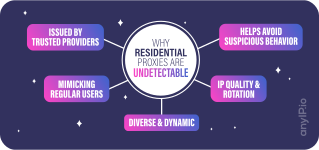
Residential IPs enjoy natural protection against websites that try to track you or detect automated connection requests. This is due to various features that quality proxy providers, such as anyIP, can ensure.
Issued by trusted providers: residential IPs are assigned by legitimate internet service providers (ISPs) that supply internet connections to homes and businesses. Websites generally trust traffic from these known, reputable sources.
Mimicking regular users: because IPs are used by everyday people browsing the web, their activity patterns appear indistinguishable from usual internet traffic. It's difficult for websites to identify them as proxies.
Diverse and dynamic: unlike datacenter proxies, which often come from a limited range of IP addresses, residential proxies leverage a vast pool of IPs assigned to individual devices. This diversity further strengthens their disguise.
IP Quality and rotation: anyIP carefully manages its proxy network, removing low-quality IPs that might trigger suspicion. Rotating proxy IPs regularly can also make it harder for websites to track usage patterns associated with a single IP.
Avoiding suspicious behavior: even with the best proxies, abnormal browsing activity (like sending thousands of requests per second) can be a red flag. anyIP can help you configure your usage to mimic regular user behavior.
How Do Residential Proxies Work?
Simply put, you can think of residential proxies as a middleman between you and the target website. You pass data to the residential proxy, while the residential proxy passes it to the target website, and vice versa.
In more technical terms, the residential proxy collects all of your HTTP requests (e.g., button clicks, form submissions) and routes them through a real residential IP address. It then receives the answer from the website and sends it back to you.
Not only is your true IP address hidden, but it also makes it appear as though you are accessing the website from a different physical location. Here's a step-by-step example to help with any confusion:
You make a request. You click a link or initiate an HTTP request on a website.
The proxy server intercepts. The residential proxy collects your request.
IP swap. The proxy routes your request through a residential device, making it appear as though the request came from that device's IP address.
Website response. The website sends the response back to the proxy, thinking it's communicating with a regular user.
Data delivery. The residential proxy then forwards this data to you, completing the cycle.
So, the proxy server keeps the user and the website totally separate. Your IP address is never revealed to the website.
How Residential Proxies are Sourced
Unlike datacenter proxies, residential proxy networks are built in partnership with ordinary users. Devices for residential proxy servers are sourced through consent-based programs, where owners knowingly contribute their idle bandwidth in exchange for fair compensation.
Such an ethical model stands in contrast to how some unreliable or free proxy providers operate. In most cases, residential proxies are sourced by buying them from other resellers or by teaming up with app developers so they would include your SDK in their apps.
Residential proxy pricing explained
Most residential proxies are priced per GB of bandwidth consumed, rather than per IP used. Per IP models are more common in ISP or datacenter proxy types, where commercial servers can create IPs in bulk through virtual machines.
The residential proxy pricing model reflects the cost of maintaining ethical sourcing, peer networks, and large IP pools. It might seem more expensive at first, but considering better success rates and overall performance, the prices become comparable.
Volume discounts also make residential proxies more affordable at scale. With anyIP, your unused data rolls over to the next month if you renew your subscription. All bandwidth you purchase can be used, ensuring you get the best price per GB even for smaller-scale tasks.
How Do Residential Proxies Compare With Other Types of Proxies?
| Residential Proxies | Free Proxies | Datacenter Proxies | Mobile Proxies | ISP proxies | VPN | |
| Source | Home networks | Data centers | Data centers | Mobile Networks | Data center-hosted ISP IPs | Data centers |
| Anonymity | High | Low | Low | High | High | High |
| Undetectability | High | Low | Low | High | Medium | Low |
| Blocking Risk | Low | Very High (usually blacklisted) | High (often blacklisted) | Low | Medium | Medium (occasionally blacklisted) |
| User Identification | Moderate (can be traced to individual households) | Very Easy (some of them send your IP address to the server) | Easy (often static and tied to specific organizations) | Hard (dynamic and diverse IPs) | Moderate (varies by setup; traceable to ISP ranges) | Easy (often static and tied to specific organizations) |
| Speed | Fast | Very slow | Very fast | Fast | Fast | Medium |
Pros and Cons of Using Residential Proxies
Pros
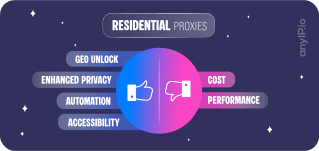
Enhanced privacy. Residential proxies enhance privacy by concealing your original IP address. It's an additional layer of security against potential surveillance and ensures a more confidential online presence.
Bypassing geo-restrictions. Residential proxies can overcome geographical barriers, allowing users to access region-specific content and services more easily, thereby enabling a more global online experience.
Improved efficiency in automation. Residential proxies are useful tools for web scraping and automation tasks, as they help bypass obstacles like IP blocks and bans, resulting in enhanced efficacy and efficiency in data collection and automated online activities.
Compatibility. Residential proxies offer a universal solution for almost all devices and operating systems to bypass restrictions. You can access content and enable various use cases, whether it's managing multiple accounts, SEO monitoring, or simply browsing the web.
Cons
Cost. Premium pricing compared to some other proxy types. anyIP offers flexible pricing and tools to help you manage performance for your specific needs.
Performance. A slight speed reduction may occur compared to proxy servers optimized for high-bandwidth tasks.
How to Set up a Residential Proxy
1. Choose a Proxy Provider
The first step in setting up a residential proxy is choosing a provider. Not all proxy providers are created equal. Some have unreliable servers, others use low-quality IPs, or have poor customer support. There are a few clear criteria to look for when choosing a provider.
Pool Size & IP Quality
Pool size is about how many IP addresses the provider has in their pool. Generally, more is better (if the IP addresses are also high-quality) because it means you can rotate IPs more easily.
At anyIP, we have a massive pool of over 100 million IPs that are constantly updated and sorted by various criteria for easy selection. We also prioritize IPs from a variety of ISPs to guarantee our users can access a wide range of different subnets, an average response time of ~0.6 seconds, and a 99.3% request success rate.
Location Coverage
One of the main reasons people use residential proxies is to change locations, such as to access geo-restricted content or for ad verification. So, it makes sense to look for varied location coverage in a provider.
At anyIP, we offer city-level targeting across Europe, Asia, and North America. There’s a ton of flexibility when choosing an IP address that meets your needs.
Reputation
A provider's reputation is crucial for ensuring reliable and ethical service. Look for reviews, case studies, or testimonials from current users to gauge the provider's standing in the market.
At anyIP, we guarantee high success rates of our residential proxies for various online activities as follows:
95% success rate on e-commerce platforms like Walmart, Wayfair, Craigslist, AliExpress, and Amazon.
99.9% success rate for SEO monitoring on search engines like Google, Yahoo, Bing, and Yandex.
90% success rate on travel aggregation sites like Booking.com, TripAdvisor, and Expedia.
Pricing
Residential proxies typically come at a premium due to their legitimacy and effectiveness in mimicking real user behavior. Pricing models vary, including pay-as-you-go, monthly subscriptions, or based on the amount of traffic used.
Make sure the pricing aligns with your usage needs and budget.
anyIP offers residential proxies at competitive prices, starting as low as $2 per gigabyte. We provide access to a large pool of over 100 million residential and mobile IPs with a success rate of around 99.3% and an average response time of approximately 0.6 seconds, making us a cost-effective and efficient choice for various proxy needs.
2. Integration
Integration in the context of residential proxies just means configuring your proxy. Providers like anyIP make this easy by:
Providing tools that ensure proxies are configured to work across whatever applications you need them for.
Offering dedicated support to assist with any integration issues or questions via live chat.
Creating detailed guides to help you quickly configure and use the proxy.
anyIP also supports multiple protocols (HTTP, HTTPS, and SOCKS5) and various authentication methods (username/password, IP whitelisting, etc.). You can be sure that our proxies will be easy to integrate into any software that you need.
What Are Some Common Use Cases for Residential Proxies?
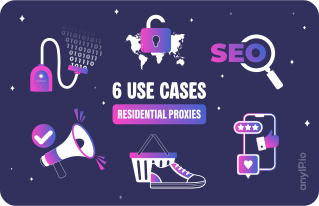
Efficient web scraping: residential proxies help you avoid rate limits and anti-scraping protocols by rotating different high-quality IPs. This means you can load tens of thousands of pages without triggering any red flags.
Ad verification: you can use residential proxies to load your ads from different locations to see when, how often, and where they're displayed.
Accessing geo-locked content: with a residential proxy, you can access geo-restricted websites or content, such as Telegram, in censored regions by appearing to come from the same location as that website's target audience.
Safe Account Management: maintain multiple social media or website profiles without the risk of bans or detection. Each account looks like it's being managed by a unique individual.
Competitive sneaker shopping: boost your success rate when buying limited-edition sneakers by using multiple residential IPs to create different online identities.
Additionally, you can also use residential proxies for:
SEO performance monitoring
Market research
Price comparisons
Data mining
Ethical Considerations and Legality
Many question if residential proxies are legal due to their historical association with illicit activity. Proxies, however, also have many legitimate uses, such as market research, price comparison, accessing geo-restricted content, and safely managing multiple accounts. It's not about the tools you use, but what you do with them.
Avoid any activities that violate privacy laws or the terms of service of the websites you access. Using proxy servers for fraud or other illicit activities may carry legal responsibility.
Residential proxies also have an important dimension in ethical sourcing. Your provider might not source IPs with participant consent, so always choose a reliable provider, such as anyIP, that ensures ethical and legal standards.
Conclusion
Residential proxies offer a versatile solution for a range of tasks, including ad verification, web data collection, automation, and more. anyIP is a reliable residential proxy provider offering a range of features and services optimized for diverse uses of residential proxies.
Frequently Asked Questions
What is the difference between a residential proxy and a VPN?
Residential proxies route your traffic through physical devices with IP addresses assigned by residential Internet service providers. VPNs most often use data center servers that run multiple virtual machines. VPNs provide encryption, but their IPs are much easier to track and block. Proxies, especially rotating residential proxies, are harder to detect.
What is the difference between a residential proxy and a private proxy?
Residential proxies are a proxy type determined by the source of IPs. They originate from household devices with IPs from residential Internet service providers. Private proxies refer to a type of proxy server that is exclusively dedicated to one user. Dedicated residential proxies are less frequent than dedicated datacenter proxies or dedicated ISP proxies.
Where do residential IPs come from?
Residential IPs come from household devices, such as PCs or laptops, connected to the internet via a residential internet provider. Legitimate residential proxy providers, such as anyIP, source residential proxy servers through informed, consent-based programs. Their participants knowingly agree to share their connection for proxies and get compensated for it.
How long do residential proxies last?
With anyIP, you can retain the same IP address for up to seven days or use rotating residential proxies with custom parameters. Static residential proxies are often best for long-term use, but the actual IP address changes depend on your usage and the quality of the residential proxy network.
Are residential proxies safe?
Residential proxies are generally safe to use, but it also depends on your residential proxy provider. When you buy residential proxies from a reputable and trusted provider, such as anyIP, there are no risks of unethical sourcing, issues, or web data leakage. Poorly managed free proxy providers can expose you to such risks.
Article by
Khaled Bentoumi
Khaled is a software engineer. He's been involved in many startups of different sizes. Previously, he founded Data to Page, an AI Programmatic SEO startup. He now handles all the marketing at anyIP.


:format(webp))
:format(webp))
Read more
:format(webp))
Scamalytics Proxy Detection Explained
Learn how fraud scores work, what the proxy and residential labels mean, and how to read a Scamalytics result for your own IPs.
:format(webp))
:format(webp))
Proxy vs VPN vs Antidetect Browser: Which to Choose?
Compare proxy vs VPN vs antidetect browser by IP address control, encryption, browser fingerprints, scalability, and the best use case for each.
:format(webp))
What Is TCP/IP Fingerprinting and How Does It Work?
Learn what TCP/IP fingerprinting is, how it works, what it can reveal, and how proxies, VPNs, and network devices affect your fingerprint.